
Top 100 Technology Products
The pace of innovation in tech has never been faster — with hundreds of new devices launching every year, finding what actually delivers can be overwhelming. From cutting-edge headphones and powerful laptops to smart home devices and immersive entertainment, today’s standout products are redefining what’s possible. We’ve curated a dynamic lineup of the most exciting, high-performing, and talked-about tech across categories — chosen for performance, innovation, and real-world value. Whether you’re upgrading your setup or exploring what’s new, these are the products setting the standard right now.
Best Headphones


#3
Bose QuietComfort Ultra Headphones
Bose
Immersive audio, adaptive noise canceling, premium comfort
Best Overall

Best for Travel

Best Value
Trending




#12
Nintendo Switch OLED Model
Nintendo
Portable gaming, vibrant OLED screen, docked or handheld play


#18
Apple MacBook Air 13-inch
Apple
Thin and light laptop, all-day battery, strong everyday performance



Best for Gaming




#30
Belkin 3-in-1 MagSafe Charger
Belkin
MagSafe charging stand, iPhone Apple Watch and AirPods support


Trending

#33
Anker Soundcore Space One Pro
Soundcore
Wireless headphones, active noise canceling, travel-friendly audio





#44
Ubiquiti UniFi Dream Router 7
Ubiquiti
Advanced home networking, Wi-Fi 7, prosumer router platform


Trending



#58
SteelSeries Arctis Nova Pro
SteelSeries
Gaming headset, high-fidelity audio, noise canceling mic
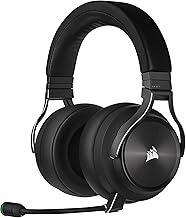
#59
Corsair Virtuoso RGB Wireless
Corsair
Premium gaming headset, high-quality microphone, wireless audio


Trending




Trending


#71
Microsoft Surface Laptop 6
Microsoft
Premium laptop, sleek design, strong productivity performance




Trending

Trending

Best Budget Streaming


Best Budget Smart Cam


Best TV Overall


Best Budget Lighting
